

ToDo for Google vs TasksBoard vs PWA
If you want to use Google Tasks properly on your desktop, there are really only three options: ToDo for Google (which we build), TasksBoard with its kanban boards, and installing the official web version as a PWA.
This article compares the three by price, delivery model, and what each one actually does. We make ToDo for Google, so to let you read this with that in mind, we have kept in the places where TasksBoard is the better choice and the features our app does not have. Everything here was checked against the official sites in August 2026.
The short answer
If you want to see several lists side by side on a kanban board, or share tasks with a team, TasksBoard is the right fit. Kanban and list sharing are things our app does not do.
If you want to capture a task the moment you think of it and work through your list from the keyboard, ToDo for Google suits you better. You can add a task with a shortcut from any app, and set due dates with the number keys. It is a one-time purchase, so there is no monthly cost.
If you just want to try something without spending anything, or you would rather not install another app, the PWA is enough. It is the official web version in its own window, so it does not add features beyond what the web version already has.
Comparing the three
| Capability | ToDo for Google | TasksBoard | PWA |
|---|---|---|---|
| Price | One-time purchase (7-day free trial) | Free plan available / Pro from $3.99 per month, billed yearly | Free |
| How it runs | Mac and Windows app | Web app (installed as a PWA) | Web app |
| Kanban board view | No | Yes | No |
| Three-column view (lists, tasks, details) | Yes | No | No |
| Add a task with a shortcut from any app | Yes | No | No |
| Keyboard shortcuts for working through tasks | Yes | Not documented | No |
| Sharing lists and working as a team | No | 5 lists on the free plan / unlimited on Pro | No |
| Searching tasks | Yes | Yes | Yes |
| Dark mode | Yes | Yes | No |
| Working offline | Yes | Needs a connection (changes sync once you are back online) | Needs a connection |
Based on what was published on each official site as of August 2026. Prices and specifications may change.
Price
This is where the three differ most. TasksBoard is a subscription with a free tier, ToDo for Google is a one-time purchase, and the PWA is free.
TasksBoard's free plan still gives you the kanban board and sync with Google Tasks. What it limits is sharing (five lists) along with multiple boards, labels, and export to Google Sheets. Pro is $3.99 per month billed yearly, or $4.99 month to month (as listed on the official site in August 2026).
ToDo for Google gives you a 7-day free trial, after which you buy a one-time full licence only if you want to keep it. It is not a subscription, so nothing auto-renews and there are no extra charges. The licence covers Windows, Mac, and the web browser on the account you bought it with.
The longer you use it, the better the one-time purchase looks; the more you share with a team, the better the subscription looks. Which works out cheaper depends on how you use it.
How each one runs (the difference that matters most)
This is easy to overlook, but it has the biggest practical consequences.
TasksBoard is a web app. To use it in its own window on the desktop, you install it as a PWA — that is what the official instructions describe. In other words, TasksBoard on the desktop sits on the same foundation as the PWA option.
ToDo for Google ships as an application for Mac and Windows. That difference is what makes the global shortcut described below possible.
Where TasksBoard is better
There are two things TasksBoard does that our app does not.
- Kanban board view: each Google Tasks list becomes a column, so you can see several lists side by side at once. You can drag cards between columns, and cards are colour-coded by due date. ToDo for Google has no kanban view.
- Sharing lists and working as a team: you can share a list with other people and set edit or view-only permissions. The free plan covers five lists; Pro and above are unlimited. ToDo for Google has no sharing features.
If you split tasks across a team, or you want to lay out one list per project and see the whole picture, there is a clear reason to choose TasksBoard.
Worth knowing about the sharing features
TasksBoard's shared lists and boards are a TasksBoard feature, so they are not visible in the official Google Tasks app on your phone. Shared lists also do not sync in the background — the official support pages state that you need to open TasksBoard to bring everything up to date. Both are documented behaviours.
Where ToDo for Google is better
Our app is built around clearing tasks quickly.
- Add a task without leaving what you are doing: press Command (Control) + Shift + A in any app and a quick add popup appears. You never switch to the browser. This is only possible because it runs on the OS — a web app like TasksBoard or a PWA cannot do it.
- Work entirely from the keyboard: create, search, and complete tasks, and set due dates with the number keys — 1 for today, 2 for tomorrow, 3 to 9 for later, 0 to clear the date. It makes a real difference when you have a backlog to get through.
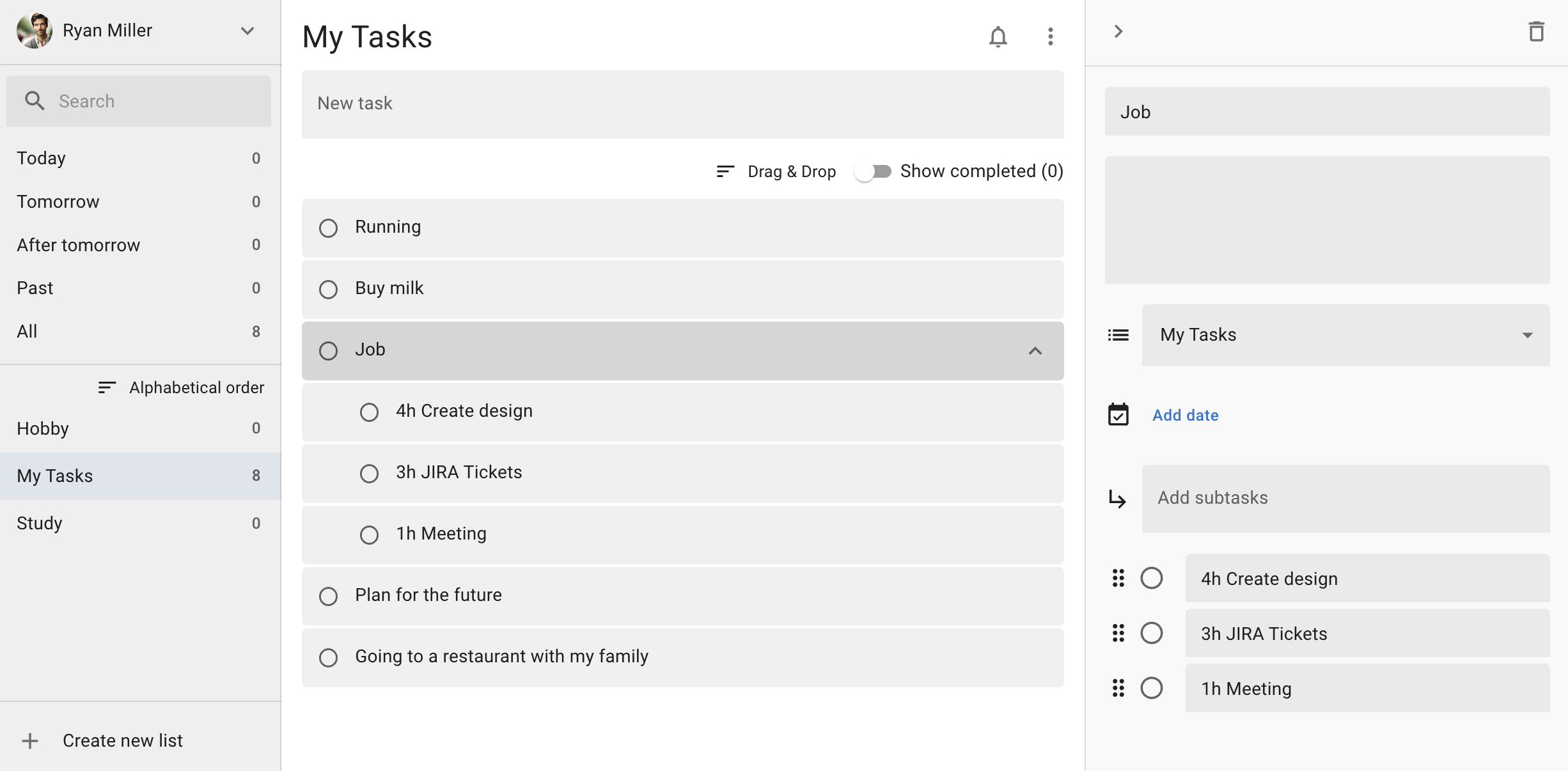
- Three-column full screen: your task lists, the tasks, and the details of the selected task, all at once. Rather than laying several lists side by side like a kanban, it is built for working through one list in depth.
- Works offline: TasksBoard's official FAQ states that it needs an internet connection to sync with Google Tasks, and that offline changes are queued and synced once you reconnect.
TasksBoard's home page does mention keyboard shortcuts, but we could not find an official list of them. Our app shows every shortcut in a dedicated screen inside the app.
The PWA option
The third option is to install the official web version (tasks.google.com) as a PWA. It opens in its own window, separate from your browser tabs, and you can keep it in the Dock or on the taskbar, so it feels much closer to a regular app.
It is free, takes a couple of minutes, and you can simply uninstall it. But it is still the official web version underneath, so it adds neither a kanban view nor a global shortcut. It is the pragmatic choice when you want to try something at no cost, or when you cannot install software on a work machine.
What all three have in common
All of them sync through Google's official Google Tasks API, so they read and write the same data. Anything you change on the desktop shows up in the Google Tasks app on your phone and in the side panel of Gmail and Google Calendar.
There is also a shared limitation. Because of the Google Tasks API, no third-party app can set a time of day on a due date or create repeating tasks — TasksBoard's own support pages say the same. If you need those two things, it may be quicker to look at a task manager other than Google Tasks.
Frequently asked questions
Does TasksBoard have a desktop app?
There is no native app for Mac or Windows. To use it in its own window on the desktop you install it as a PWA, which is what the official support pages describe.
Does ToDo for Google have a kanban board?
No. It uses a three-column layout: your task lists, the tasks, and the details of the selected task. If you want several lists side by side on a kanban, TasksBoard is the better fit.
Do all three show the same tasks?
Yes. They all read and write the same Google Tasks data through Google's official API, so whichever you edit in, the contents match. You can try them in parallel and keep whichever suits you.
Can I use more than one of them?
Yes. They are all looking at the same data under the same Google account, so you could use ToDo for Google day to day and open TasksBoard only when you need to share something.
Which one works out cheaper?
It depends how long you use it. ToDo for Google is a one-time purchase, so the cost per year falls the longer you keep it. TasksBoard is a subscription, though its free plan still covers the kanban board and Google Tasks sync; you need a paid plan once you go beyond five shared lists or want multiple boards.
Try ToDo for Google
There is a 7-day free trial, so you can see how the global shortcut and keyboard workflow feel before deciding.